
Fit the specified discharge resistor when a newer ITE220 tactile unit on a Telent Optima cloned phase causes a green conflict or GNC fault.
Symptoms and cause
The tactile unit can retain enough residual current on an otherwise unloaded cloned phase to trigger a green conflict or GNC fault. The controller may then switch off all street lamps as a safety action.
Resolution
Only competent traffic signal personnel should complete this modification. Isolate the supply, prove it is dead and follow all controller and site safety procedures.
-
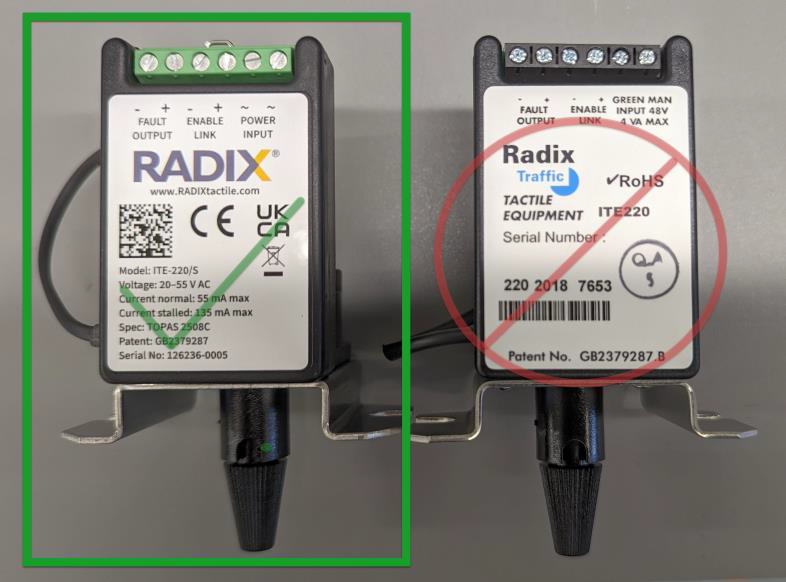
Confirm that the tactile unit carries the newer yellow logo and that it is connected to a Telent Optima cloned phase with no other load.
-
Obtain a 10 kilohm 5 percent 0.5 watt resistor. The source identifies RS Components part 707-8300.
-
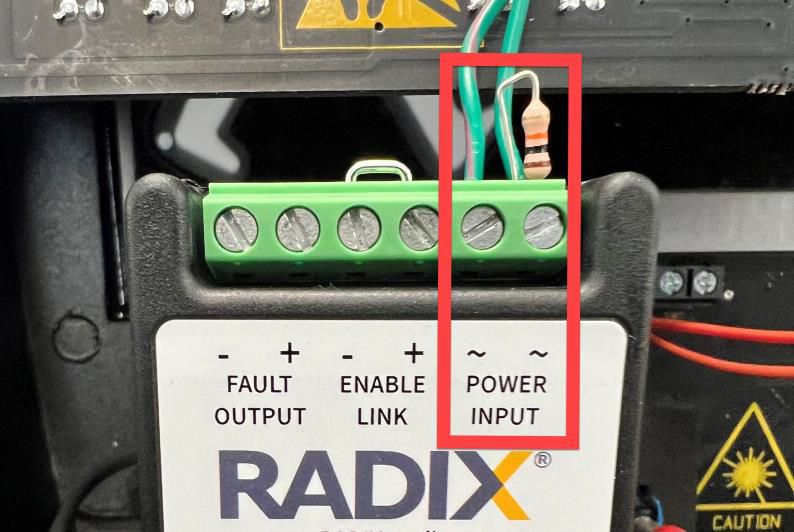
With power isolated, connect one resistor across the power terminals of each affected tactile unit.
-
Check the termination, refit all covers and restore power under the approved procedure.
-
Clear the controller fault and confirm that the phase operates without a green conflict or GNC fault.
If the fault remains, remove the modification from service and contact AGD Technical Support and the controller manufacturer for further diagnosis.
Applies to Radix ITE220 tactile units carrying the newer yellow logo and powered from a Telent Optima cloned phase with no other load
Source TAN45 issue 1 6 January 2023