
Sometimes it may be necessary to change the Highway Authority with which a device is enrolled, for example, if a Highways Authority chooses to sell a device to another Highways Authority.
To do this, a user with permission to access devices belonging to the device’s current Highway Authority must first release the device, before it can be assigned to its new owner.
Step 1. Connect to the Detector
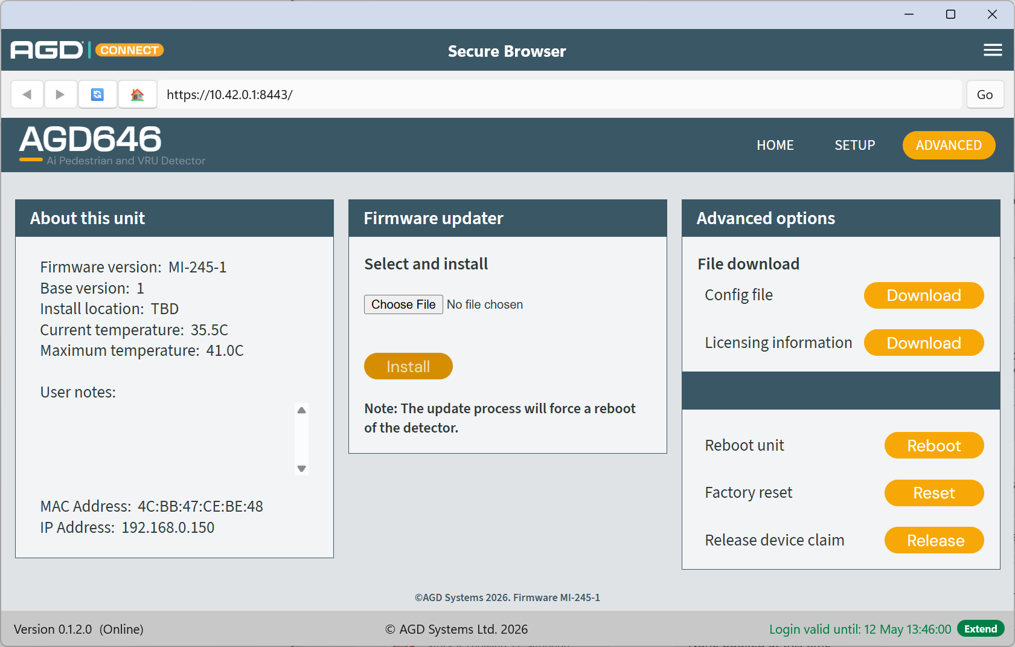
First, an Approved User must connect to the detector using the Secure Browser. Navigate to the 'Release device claim' option at the bottom right of the screen and press the 'Release' button.
Step 2: Confirm your selection
After selecting 'Release', a warning message informs the user that once the device is released, it may be claimed by another Highway Authority.
Press 'OK' to proceed.

To reduce the risk of unintended device releases, a second confirmation message will be displayed.
If you are sure you want to perform the release action, press 'OK' to proceed.

Step 3. Reclaiming device
The device has now been released and the browser can now be closed.
To reassign the detector to a new owner, follow the same process as a installing a new device.