
Power Requirements
The AGD650 supports:
- 24V AC/DC
- 42V AC
Voltage tolerance:
±20%
Fuse Protection
The detector can draw an inrush current of up to:
- 15A for less than 5ms during startup
Recommended protection:
- 3A circuit breaker
- 3A inline fuse
Earth Connection
The earth/ground conductor must always be connected.
Failure to connect earth may result in unreliable operation or safety concerns.
Output Configuration
The AGD650 provides two independent opto-isolated outputs:
| Output | Function |
|---|---|
| Opto 1 | Zone 1 Detection |
| Opto 2 | Zone 2 Detection |
Each output includes:
- Common
- Normally Open (NO)
- Normally Closed (NC)
Wiring Diagram
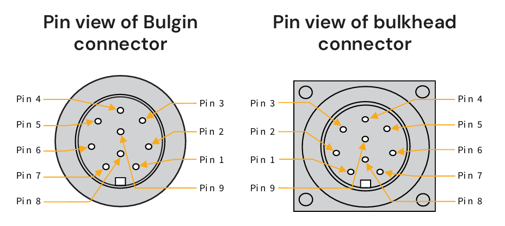
| Single Cable 24V ac/dc, 42V ac Supply Wiring (1m bulkhead lead with Bulgin connector) | ||||||
| Pin No. | Wire Colour | Function | Power Off | Power On - No detect | Power On- Detect | Notes |
| 1 | Red | 24V ac/dc, 42V a | - | - | - | - |
| 2 | Black | 0V ac/dc | - | - | - | - |
| 3 | Green | Earth/Ground | - | - | - | Must be connected |
| 4 | White | Opto 1/2 Common | - | - | - | - |
| 5 | Yellow | Opto 1 N/O | N/O | N/C | N/O | Zone 1 |
| 6 | Blue | Opto 1 N/C | N/C | N/O | N/C | Zone 1 |
| 7 | - | Not Connected | - | - | - | - |
| 8 | Brown | Opto 2 N/O | N/O | N/C | N/O | Zone 2 |
| 9 | Violet | Opto 2 N/C | N/C | N/O | N/C | Zone 2 |
|
Single Cable 24V ac/dc, 42V ac Supply Wiring (5m flying lead) |
|||||
| Wire Colour | Function | Power Off | Power On - No detect | Power On- Detect | Notes |
| Red | +24V ac/dc, 42V a | - | - | - | - |
| Grey | 0V ac/dc | - | - | - | - |
| Green | Earth/Ground | - | - | - | Must be connected |
| White | Opto 1/2 Common | - | - | - | - |
| Yellow | Opto 1 N/O | N/O | N/C | N/O | Zone 1 |
| Blue | Opto 1 N/C | N/C | N/O | N/C | Zone 1 |
| - | Not Connected | - | - | - | - |
| Brown | Opto 2 N/O | N/O | N/C | N/O | Zone 2 |
| Pink | Opto 2 N/C | N/C | N/O | N/C | Zone 2 |
Opto-Coupler Ratings
| Specification | Value |
| Maximum Current | 60mA |
| Maximum Voltage | 60V |
| On-State Impedance | 25Ω |
LED Behaviour During Startup
- Red LED illuminates for approximately 30 seconds.
- Red LED flashes 5 times.
- Normal operation begins.
If no detection zones are configured:
- Red LED remains on continuously.
If zones are configured:
- Red LED illuminates only when detection is active.
Common Wiring Checks
- Verify supply voltage is present.
- Confirm earth connection is fitted.
- Check output wiring against controller requirements.
- Verify the red LED startup sequence completes successfully.